Pine Lab

Build trading scripts by describing them.

Tell the AI what you want in plain words. Pine Lab writes the Pine Script, runs it on a live chart and backtests your strategy, so you can see if the idea works.

Indicators and strategies · Pine Script v6

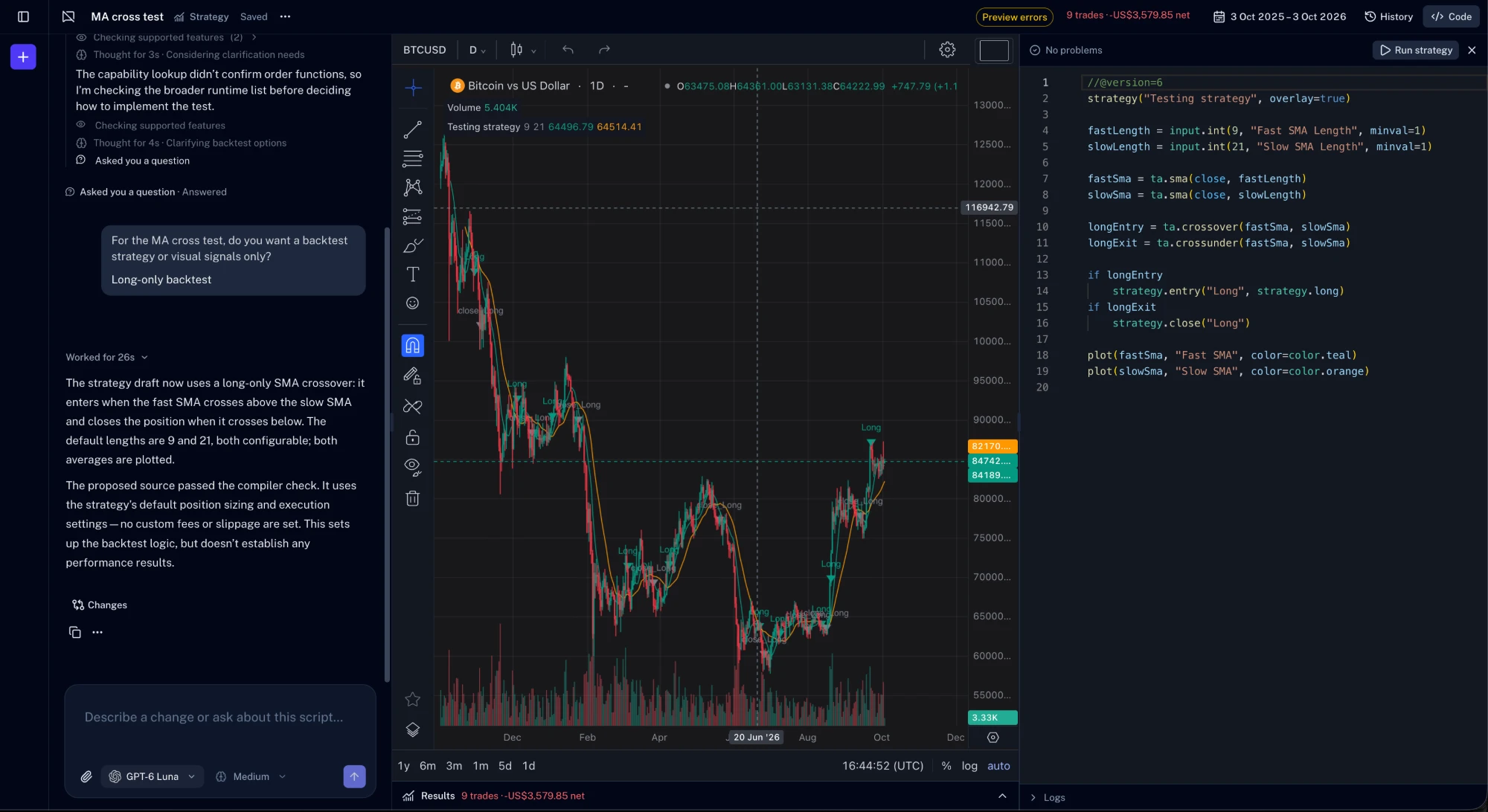
Pine Lab with the AI chat, a strategy on a Bitcoin chart and the Pine Script editor
The problem

Great trading ideas stuck in your head

Turning a setup into a script used to mean learning to code first. Most ideas never made it that far.

  • Code gets in the way

    You know the setup you want, but learning a scripting language takes weeks before you can test it.

  • Ideas never get tested

    Without a script, a promising rule stays a hunch. You can't see how it would have played out.

  • Copy-paste debugging

    Scripts from forums break on the first error, and you're left guessing what the message means.

How it works

From idea to script in one conversation

No setup and no syntax to learn. Start with what you already know about the market.

  1. 1

    Pick indicator or strategy

    Indicators draw signals and levels on the chart. Strategies add buy and sell rules you can backtest.

  2. 2

    Describe what you want

    Write it the way you'd explain it to another trader. If something is unclear, the AI asks a quick question first.

  3. 3

    See it, then refine it

    The script runs on a live chart. Check the results, ask for changes, and keep going until it's right.

An assistant that knows Pine

Ask it to write something new, explain a script line by line, or find out why one won't run. It works on the code that's open in front of you.

  • Write indicators and strategies from a description
  • Explain or fix any script
  • Attach chart screenshots to show what you mean
  • Choose the model and how hard it thinks

You stay in control of every change

The AI never hides what it did. See exactly which lines changed, undo anything you don't like, and go back through the history of your script.

  • Line-by-line view of every AI change
  • Undo in one click
  • History of every version that ran on the chart
  • Your drafts save as you type

Backtest a strategy in seconds

Run a strategy and its trades appear on the chart, with results right underneath. Change the data range or the settings and run it again.

  • Total P&L, win rate, profit factor and drawdown
  • Every trade listed and marked on the chart
  • Set order size, commission and slippage
  • Pick the date range to test

A full workspace, not just a chat

Chat, chart, code and results in one place, built for how traders actually work.

  • Indicators and strategies

    Start with either, or convert one into the other.

  • Pine Script v6

    Work in a language many traders already know.

  • Any symbol or timeframe

    Switch the chart without losing your work.

  • Choose your model

    Pick the model and the effort for each request.

  • Image attachments

    Add up to four chart screenshots to a message.

  • Autosave

    Drafts are saved while you type.

  • Script library

    Save finished scripts to reuse later.

  • Problems and logs

    Errors are flagged as you type, logs sit under the code.

Questions, answered

Can't find what you're looking for? Email our support team and we'll get back to you.

support@tradersign.com

Pine Lab is a workspace for building trading indicators and strategies. You describe what you want, the AI writes the Pine Script, and you see it running on a chart right away.

No. You can build a script entirely by describing it. If you do know Pine Script, the full code is always there to read and edit yourself.

Pine Lab uses Pine Script version 6, so most scripts work as they are. If a script uses something that isn't supported yet, the editor points to it and the AI can suggest another way.

Yes. Paste your code into a new script, run it on the chart, and ask the AI to explain or improve it.

Every AI change shows exactly which lines were added or removed, and you can undo it in one click. Your script's history keeps earlier versions too.

Yes. Run a strategy to see its trades on the chart and its results underneath, including P&L, win rate, profit factor and drawdown.

Your next trade deserves a second look.

Connect your broker once and every trade is logged for you. Your first review takes minutes.